Guide
How to set up a client so its invoices bill themselves
Ten minutes on a client the day you sign them saves an hour a month forever. Currency, rate, invoice days, numbering, and the covering email all live on the client, which is why the second invoice takes thirty seconds when the first one took ten minutes.
For the first ten minutes with any new client · 6 minute read · Last updated
Configuration is data, not a habit
Everything that makes one client's invoice different from another's is stored on that client rather than remembered by you. The currency, the rate, when their billing cycle closes, how their invoice is numbered, and what the covering email says are all fields.
That is why adding your fifth client costs no more effort than your first, and why nothing drifts when you are busy.
Create the client
Add the client and set the currency
Currency is the field worth pausing on, because it is the one thing that is painful to change later. Set it to what the client actually pays in. Takda then picks the matching payment rails on their invoices and converts for your reports, so a Manila client in pesos and an overseas client in dollars both behave correctly without any special handling.
The list shows each client's currency, status, hours this month, and what they currently owe, which doubles as a quick read on who is worth chasing.
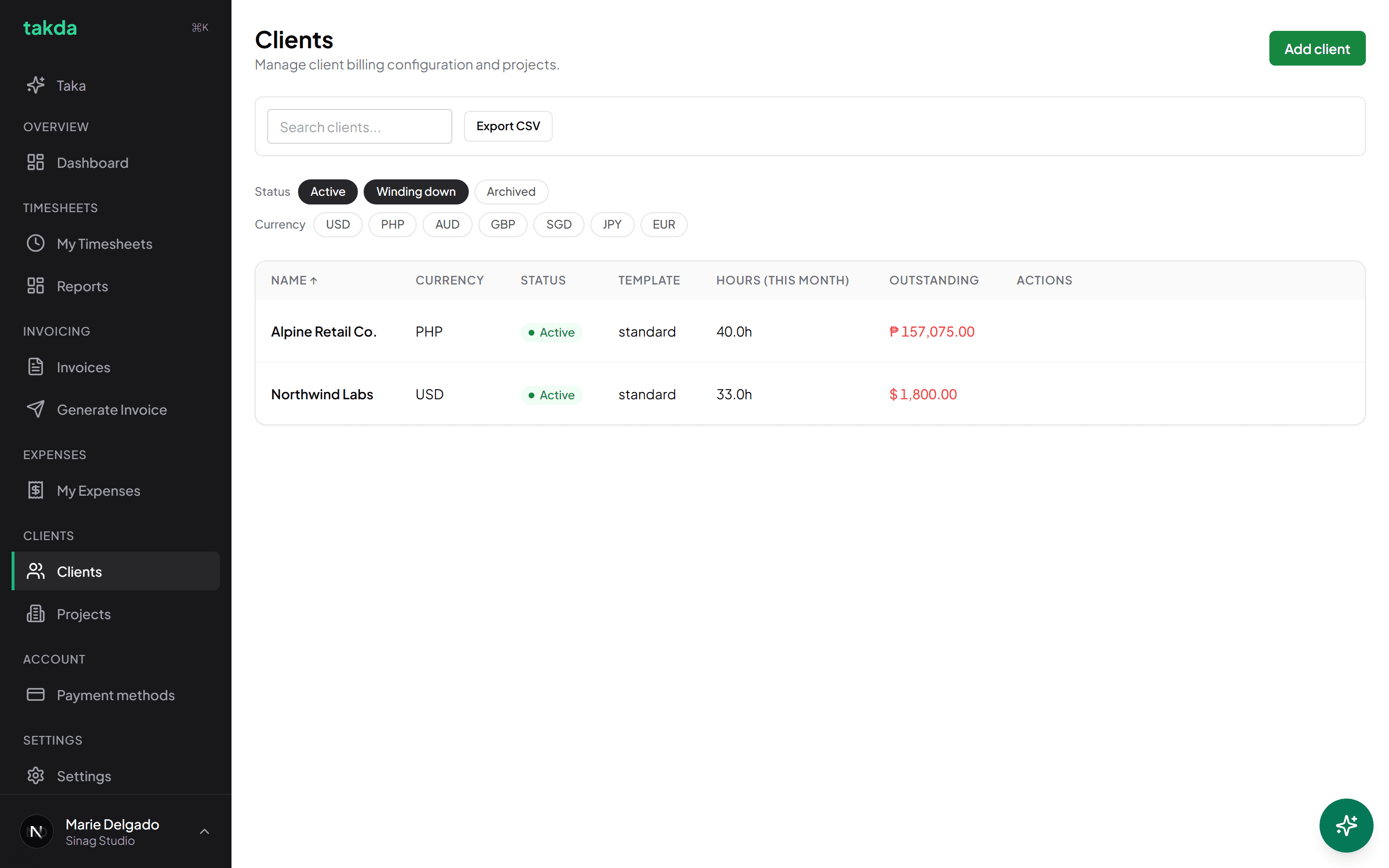
Two clients, two currencies, one account. Outstanding is shown per client in their own currency. Add a project, and give it a rate
Hours are logged against a project, never against the client directly, so a client with no project has nowhere to put time. Most people start with one project named after the engagement.
The rate lives on the project. A project with no rate produces line items worth zero, which is the single most common reason a first invoice comes out blank.
Separate projects are worth it when work is billed at different rates, or when the client wants them itemised separately on the invoice.
Set the billing config
This is the part that pays you back every month.
Choose the invoice days
Invoice days are when this client's cycle closes: monthly on set days, every week, or every fortnight. A lot of Philippine engagements run twice a month, so two days such as the 10th and the 25th is a common setting.
Takda uses this to tell you the next invoice day while you are generating, and to draft everything unbilled since the last one. It is the difference between billing on a schedule and billing when you remember.
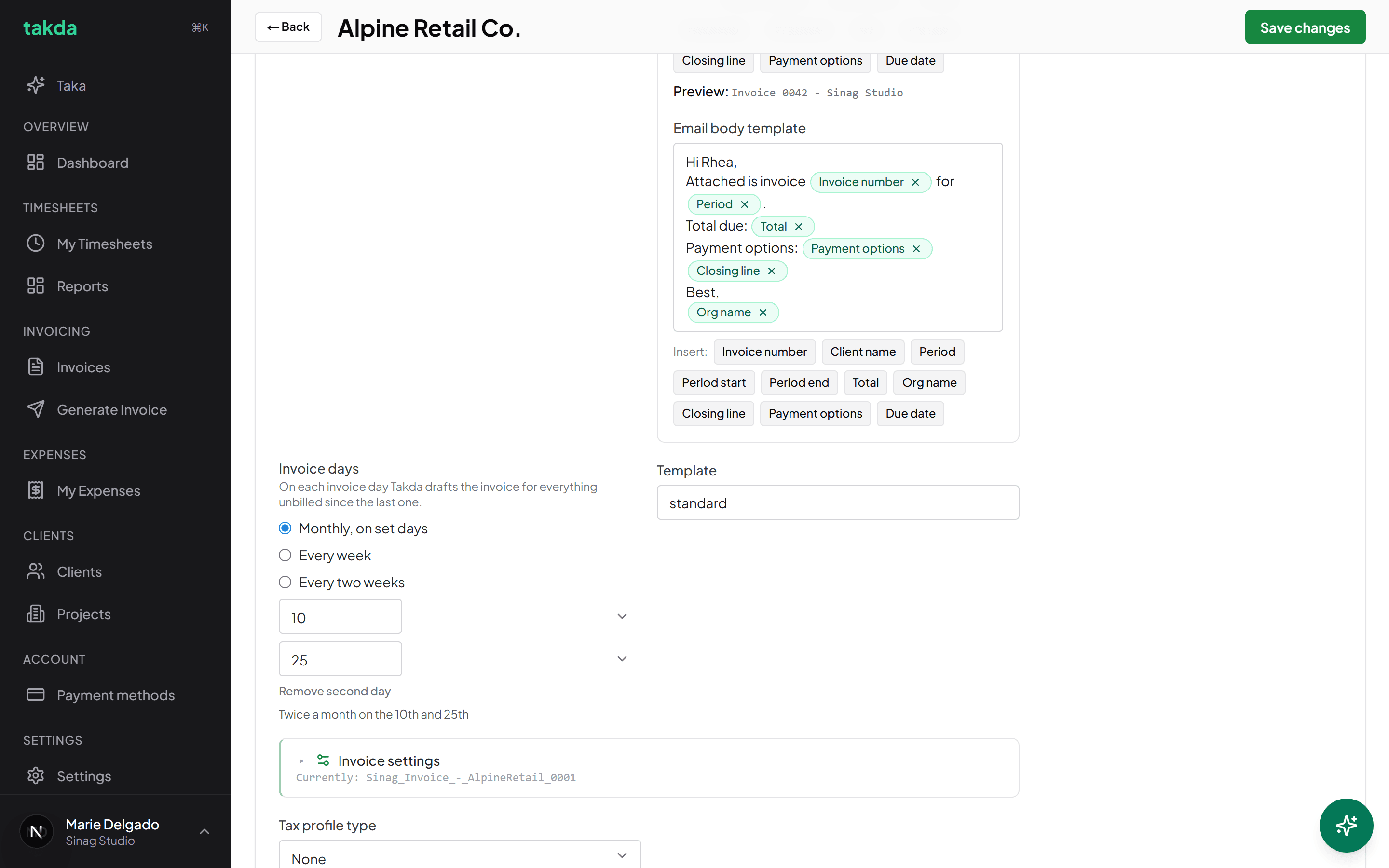
Invoice days, numbering, and the covering email, all stored on the client. Set the numbering pattern and the email template
The invoice number pattern is per client, so each one gets its own clean sequence rather than sharing a global counter with everybody else.
The email template is written once with tokens for the invoice number, period, total, and payment options. They resolve per invoice, so the covering email is correct every time without being rewritten. Address the client by name in it and it stops reading like an automated message, because it is not one.
A client is properly set up when
- The currency matches what they actually pay in
- There is at least one project, and it has a rate
- Invoice days match their real billing cycle
- A billing email is on file, and the covering email addresses a human
- The numbering pattern is one you are happy to see on every future invoice
Common questions
- My first invoice came out at zero. Why?
- Almost always a project with no rate. Hours are logged against the project, and the rate lives there, so a missing rate produces line items worth nothing. Add the rate and regenerate.
- Can I change a client's currency later?
- Avoid it. Invoices already issued keep their original currency, so changing it midway leaves a client's history split across two, which makes their outstanding balance hard to read. Set it correctly at the start.
- Do I need a separate project per piece of work?
- Only when the work is billed at a different rate, or when the client wants it itemised separately on the invoice. Otherwise one project per engagement keeps the timesheet grid simple.
- What does winding down mean on a client?
- It keeps the client and their history intact while taking them out of the pickers you use day to day, so an engagement that is ending stops cluttering your timesheet grid without being archived outright.
Try it on your own work
The free plan covers the whole loop in this guide. No card, and nothing here needs a paid feature.