Guide
How to read your reports and set aside the right tax
Two questions decide whether a freelance month was actually good: how much came in, and how much of it was never yours to spend. The reports screen answers both, and the aging table answers a third one that people tend to avoid, which is how long a client has been sitting on your money.
For anyone who wants to know where they actually stand · 6 minute read · Last updated
Set the view
Pick a period, a client, and a display currency
The three controls at the top drive everything below them. Display currency matters if you bill in more than one: Takda converts so the totals can be compared, which is why a dollar invoice can appear inside a peso total.
The three figures underneath are the summary. Billable hours is approved work in the period. Invoiced is what you have billed. Outstanding is what has been billed and not yet paid, and it is the one worth caring about.
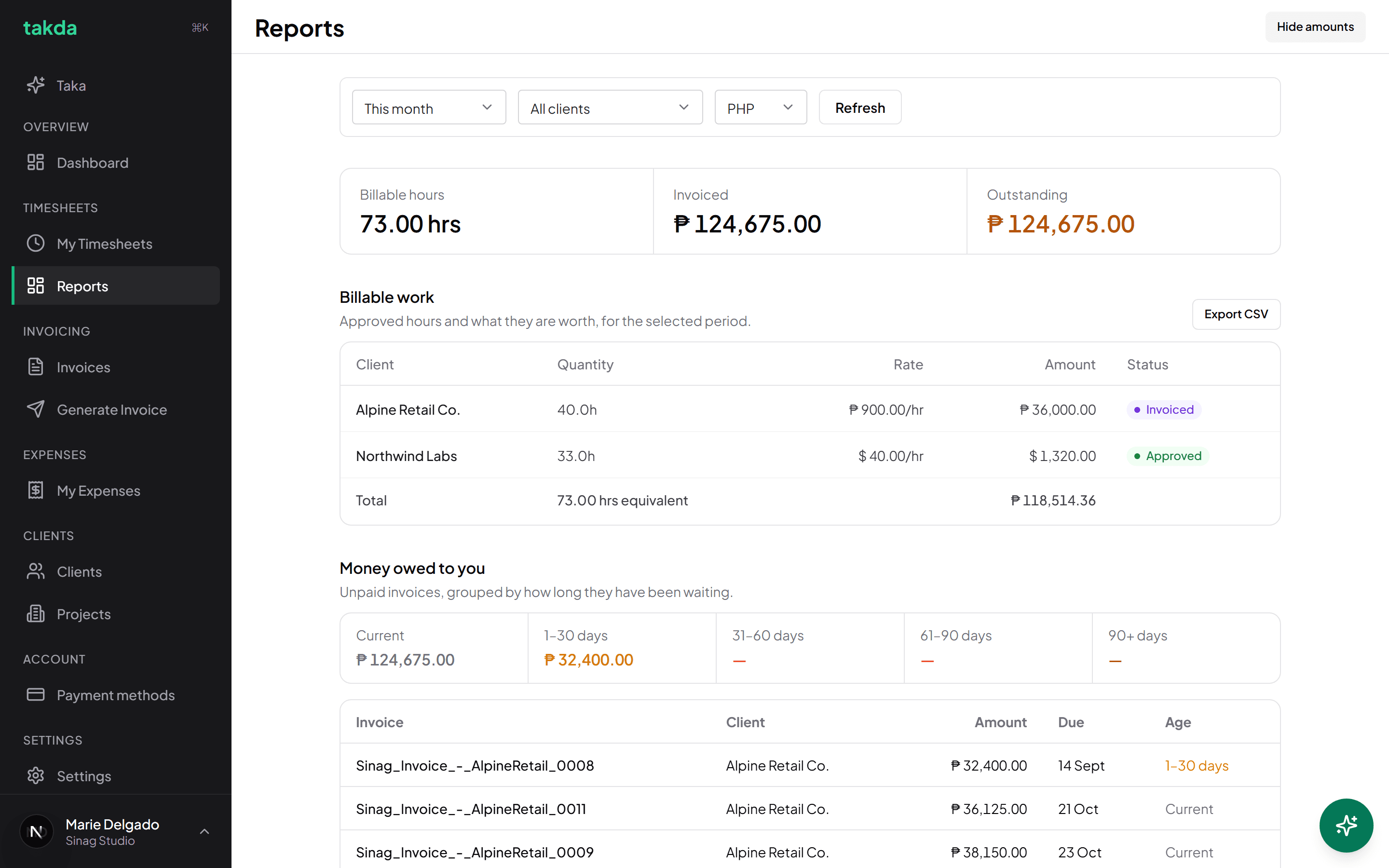
Billable work by client, with each client's own currency shown alongside the converted total. Read Money owed to you as an aging table
Unpaid invoices are grouped by how long they have been waiting: current, 1 to 30 days, 31 to 60, 61 to 90, and 90 plus.
The shape matters more than the total. Money sitting in the 60 plus buckets is not late payment any more, it is a collection problem, and it usually means reminders were switched off or the invoice reached the wrong person.
Set aside the tax
Read the tax reserve
The reserve works from money actually collected rather than money invoiced, which is the right basis: you cannot set aside tax on cash that has not arrived. It subtracts your logged expenses to reach taxable income, then applies your reserve percentage.
The quarterly table breaks the same figure down by quarter, which is the shape you need when quarterly obligations fall due.
Change the percentage in Settings. The default is a starting point, not advice.
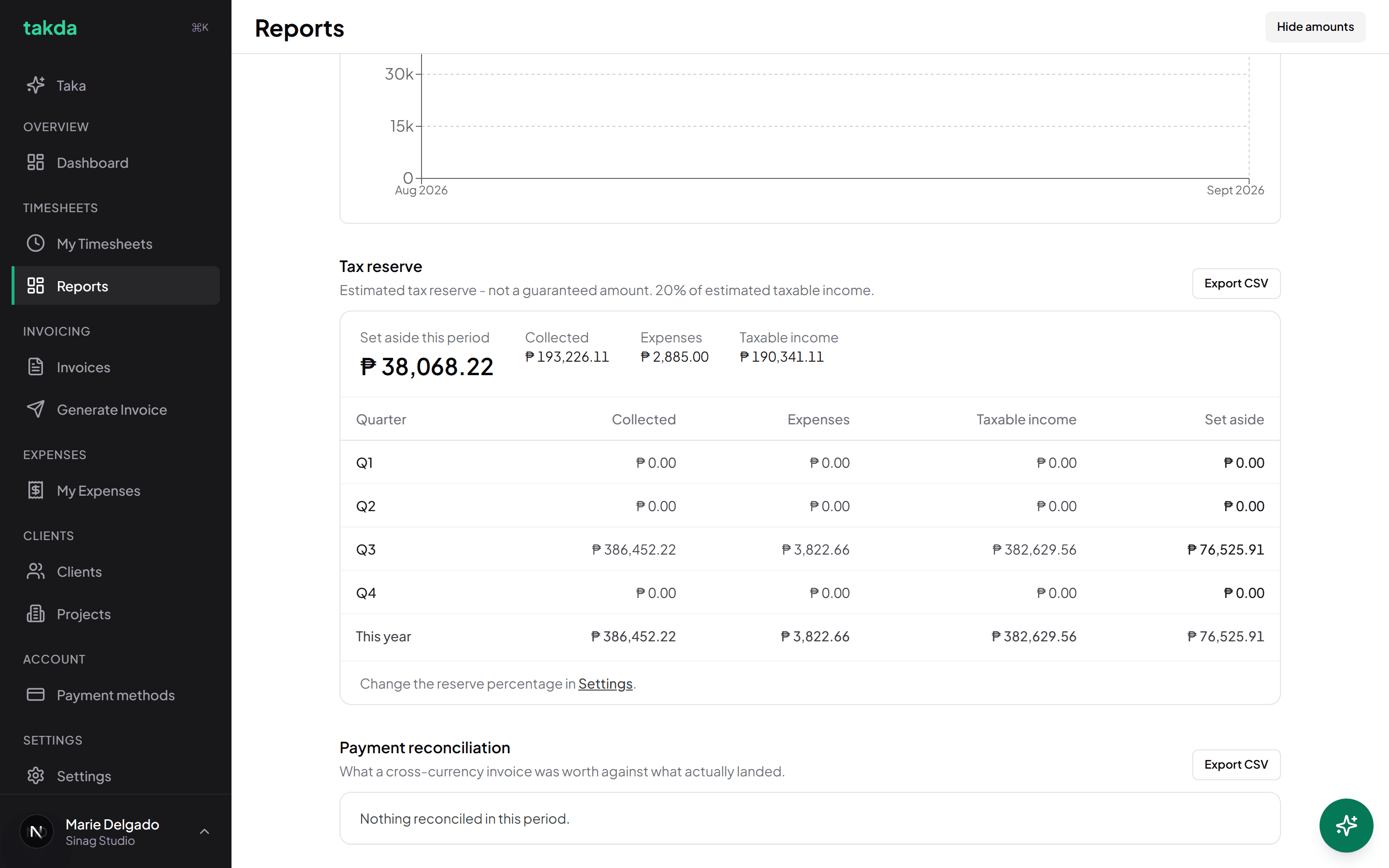
Based on what was collected and what you spent, broken down by quarter.
Which number answers which question
| Question | Where to look |
|---|---|
| Am I busy enough? | Billable hours for the period |
| Did I actually bill it? | Invoiced, against any billable work still marked approved |
| What am I owed? | Outstanding, then the aging buckets for how bad it is |
| Which client is slow? | Money owed to you, read by age rather than amount |
| How much is not mine to spend? | Set aside this period, in the tax reserve |
A five minute monthly habit
Open reports at the end of each month with the period set to that month, and check three things. That nothing is sitting in billable work still waiting to be invoiced. That nothing has drifted past 30 days. And that the reserve figure has actually been moved to a separate account, rather than just read and admired.
Export CSV on any section if your accountant wants the detail. It respects the filters you have set, so you are handing over one quarter rather than your whole history.
Common questions
- Why does my dollar invoice show up in a peso total?
- Totals are converted into the display currency you picked so they can be added together. Each client's own row still shows their real rate and amount in their own currency, so nothing is lost.
- Why is my tax reserve lower than I expected?
- It works from collected income rather than invoiced, and it subtracts logged expenses. An invoice that has not been paid yet contributes nothing until the money lands.
- Does Takda file or pay anything for me?
- No. It tells you what to set aside and gives you the numbers to hand over. Filing and paying happen elsewhere, with an accountant or a service built for it.
- Approved hours are missing from billable work. Why?
- Billable work only counts approved hours inside the selected period. Widen the period, or check whether those weeks are still sitting in draft or submitted on My Timesheets.
Try it on your own work
The free plan covers the whole loop in this guide. No card, and nothing here needs a paid feature.